Grounded AI that already knows what to ask.
Ask about your money the way you'd ask a friend. Chip In already knows your accounts, your bills, and what your partner shares, so the right questions are waiting the moment you open the app. Tap one or type your own, and get a real answer from your real numbers: in words, as a chart, or as a table.
- Questions, already written for you. "Hello, Michael. Bills are coming up." Fresh every day, from your own money.
- Charts and tables, not just text. Line, columns, ranked, tree map, or a full table. One tap to switch.
- Both of you, by permission. Only what your partner shares joins the answer. Nothing private ever does.
- Checked before you see it. Every number comes from your ledger first. Nothing is guessed.
- Yours to keep. Saved from phone to web. Export to PDF, Excel, image, or CSV.



 0
0Ask Chip In intelligence about your finances!
Mention your partner to include their finances as well.
What do my recurring bills, including TRUIST MORTG, GEICO, and Spectrum, cost each mo…
4 bills · about $1,952/moWhat do Susie and I still owe each other from our five unpaid splits, and…
5 unpaid splits · $732 outstandingWritten from your connected data. Tap one to ask.
About $1,952 a month across 4 fixed bills. Your mortgage carries most of it; the other three are steady.
Financial intelligence, in motion.
Thirteen ways Chip In turns a plain-English question into a grounded answer, with charts, tables, Smart Signals, exports, and your partner's shared data along for the ride. Swipe through, or just watch.
Pay $467.31 by Sep 23 to avoid interest on Citi ••3718.
The $136.82 minimum is due in 5 days. Your balance climbed $212 this cycle.
You don't have to think of the question. It's already waiting.
Every time the AI tab opens, Chip In reads your connected data, and what your partner shares, and writes a short set of suggestions for the day you're having: cash on hand across every account, what you two still owe each other, the subscriptions worth a second look. Tap one and the full, grounded answer follows.
- A greeting with a point"Hello, Michael. Bills are coming up. $5,596 spent so far this month, with 13 bills due this week." The lead line sets the tone; the cards do the rest.
- Both of you, by permissionCards tagged Both draw on your partner's shared accounts, bills, and splits. What they keep private never shapes a suggestion.
- Fresh when your money movesSuggestions are rewritten as balances refresh, bills post, and splits settle. Pull to refresh for a new set.
- Written from your connected dataEvery suggestion names real amounts, counts, and merchants from your ledger, and the answer is computed before the model explains it.
- Describe a ruleNew: say it in plain English, "tag anything from Kroger as groceries," and Chip In writes the rule for you.
- Cash on hand · $5,596 across 5 accounts
- Settle up · 9 unpaid splits · $429 outstanding
- Subscription check · 25 subscriptions · $607/mo


It reaches into everything you've connected. And only what your partner shares.
Generic assistants answer from whatever you paste in. Chip In Intelligence starts from your ledger: every account, transaction, subscription, split, and Smart Signal, plus your partner's finances exactly as far as they've chosen to share them.
- Your side, completelyAccounts, cards, loans, investments, recurring bills, manual transactions, and scanned receipts.
- Your partner's side, by permissionMention your partner, their name, or "we" and their shared accounts, bills, and transactions join the reasoning. Anything they keep private never enters an answer.
- Splits and Settle Up historyWho paid, who owes, and how it was settled are part of the same context, so "who owes what this month?" just works.
- Smart Signals and suggestionsThe ranked feed at the top of your app is an input too, so answers, and the day's suggested questions, already know what needs attention.
From question to verified answer in five steps.
Chip In never asks a model to guess about your money. It asks your database first, checks the query, and only then lets OpenAI's most advanced reasoning models explain what the numbers say.
- AskPlain English, on web or mobile. "Which bills went up this year?"
- PlanAI drafts a governed, read-only query scoped to you and what's shared with you.
- ValidateSQL pre-flight, schema and scope checks. Low-confidence or invalid queries retry automatically.
- ReasonThe latest GPT reasoning models work only from the rows that came back. Nothing invented.
- AnswerText, charts, and tables with suggested follow-ups. Saved to history. Exportable.
- Database-grounded, not prompt-stuffed
- Self-healing retries
- Confidence-scored answers
- OpenAI's latest GPT models
Words when you want words. Charts when you want shape. Tables when you want detail.
One question can come back as a written summary, a chart, and a sortable table, together. Follow up with a tap: "put this in a chart," "show non-cash holdings only," "break it down by account."
- Charts and graphsLine, area, columns, ranked bars, and tree maps drawn from the actual rows, with a view switcher on every answer and stat tiles for latest, change, high, and low.
- Tables you can useRanked, scrollable, and exportable to CSV or Excel. Every column traces back to your data.
- Suggested follow-upsEach answer proposes the next question, so a quick check becomes a real analysis in a few taps.
- Like, dislike, copy, retryFeedback on every answer helps Chip In keep improving quality over time.
- Rank my holdings by gain percent
- Which subscriptions went up?
- Compare this month to last year
The biggest outliers are Best Buy at $3,755.57 and two large Savannah Harley-Davidson charges at $1,500.00 and $1,000.00. Insurance runs about $538 a bill, and an $899.47 food and drink charge at Src Bit also stands out.


One question. Six ways to see it.
Ask about your spending by month and the answer arrives with its own view switcher: line, area, columns, ranked, tree map, or a full table. Same numbers, every angle, one tap apart. Tap any point, bar, or tile for its exact value.


- Latest · Change · High · Low, on every chart
- Tap a point, bar, or tile for its exact value
- Suggested follow-ups under every answer
- Light and dark, phone and web
A daily feed. One tap. The whole story.
Smart Signals sit at the top of Home, Accounts, and Recurring on web and mobile, ranked across every signal engine and curated by AI: interest deadlines, cards charged interest, concentrated positions, bills that outrun income, price hikes, dividends. Tap one and the AI analysis explains what it means, what it noticed, and exactly what to do next, grounded in your data.
- Tap for the analysisWhat this means, the bottom line, what the AI noticed across spending, cards, loans, investments, and subscriptions, and a confidence score. Hide it for a week when it can wait.
- Recommended next stepsSpecific, dated, dollar-exact actions, like "pay the full $330.49 by Oct 23 to avoid interest," with a jump straight to the forecast, the Checkup, or the transaction.
- Critical, worth a look, all clearThe header says how urgent the feed is. Critical items like a cash shortfall in the next 14 days come first; good news last.
- Avoid credit card interest
- Card spending update
- Cards charged interest
- Concentrated position
- Bills exceed income
- Charges running late
- Price went up
- Balance out of date
- Dividend received
- New merchant detected
What this means
Citi® Diamond Preferred® Card (••3718): pay $467.31 by Sep 23, 2026 to avoid interest. Current balance $467.31; minimum due $136.82; due in 5 days.
AI Diagnostics High confidence
Your balance climbed $212 this cycle on five unusually large charges. Paying the full $467.31 by Sep 23 avoids interest entirely and keeps your recent on-time streak intact; the minimum only defers it.
- Pay the full $467.31 by Sep 23
- Review the 3 unusually large charges first
- Treat the $136.82 minimum as a floor, not a target


Take the answer with you.
Any answer, any device. A PDF for a clean record, an Excel workbook for the numbers, an image for a quick share, CSV for any table. Charts and tables come along.
- PDFQuestion, answer, chart, and table on one page.
- ExcelStructured rows ready to sort, filter, and model.
- ImageA visual summary for a text, a chat, or a note.
- CSVAny table, straight into whatever you use next.
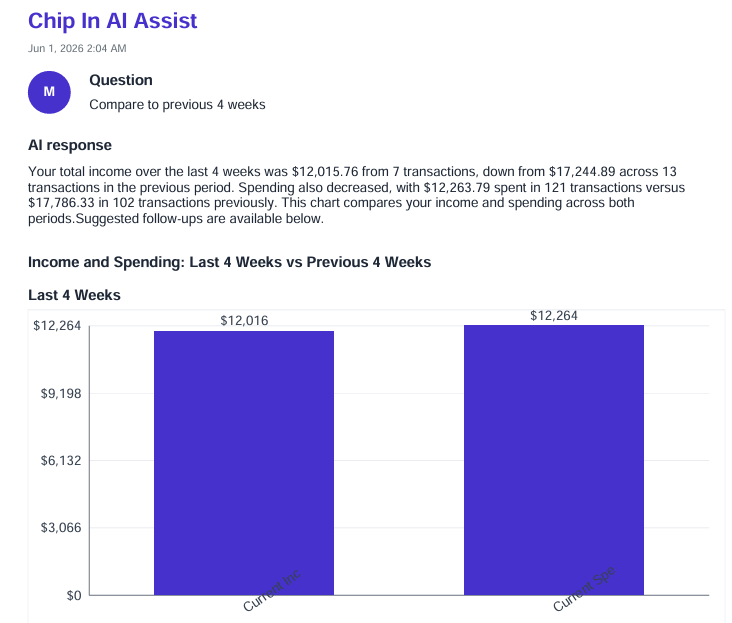 PDF
PDF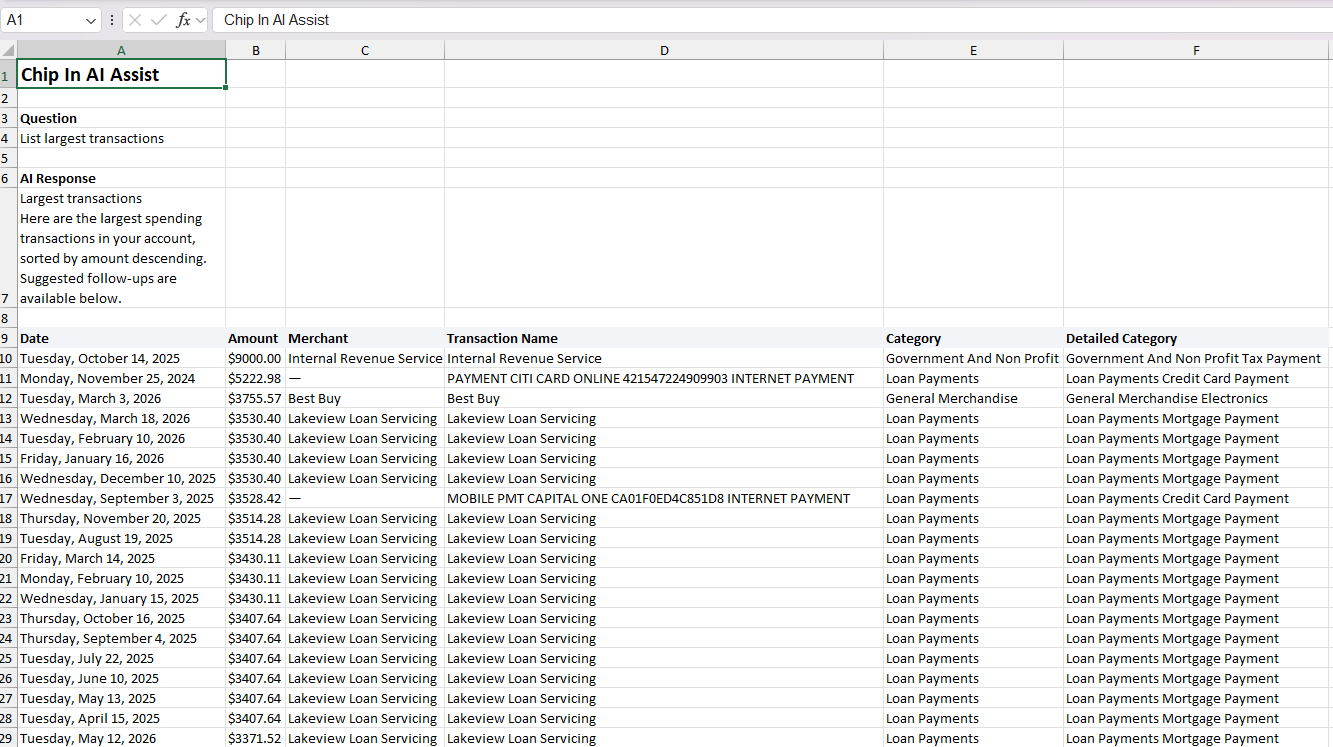 Excel
Excel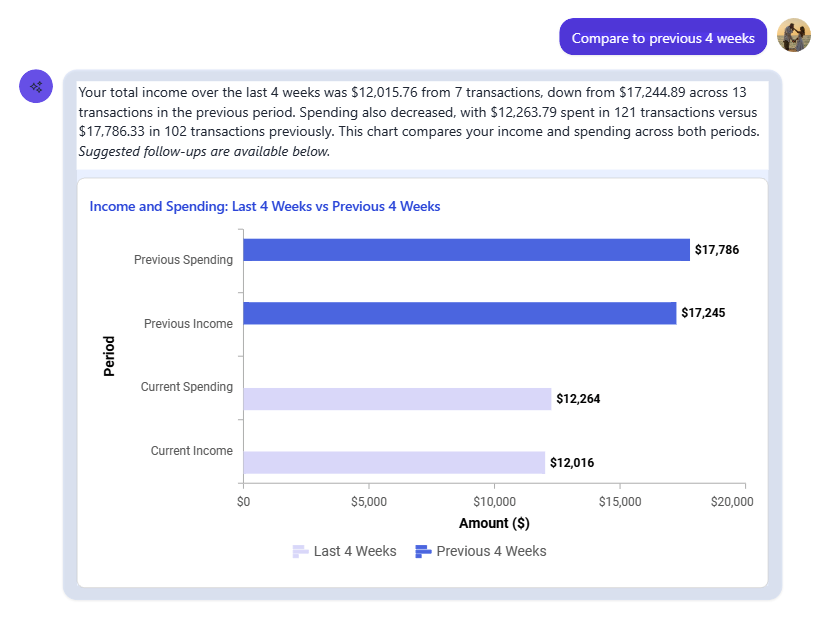 Image
Imagedate,merchant,amount 2026-03-03,Best Buy,3755.57 2026-03-04,Harley-Davidson,1500.00 2026-03-02,Harley-Davidson,1000.00 2026-02-24,Src Bit,899.47 2026-04-03,Progressive,538.61 2026-08-25,Amazon,641.99CSV
Start on your phone. Finish on the web. Or the other way around.
Every conversation is saved with its prompts, answers, charts, and tables. Open it anywhere, search it, continue it, or delete it. A question asked on your iPhone at dinner is waiting on the web at your desk, with its context intact.
- Searchable historyFind previous questions, answers, comparisons, and exports. The newest 50 load first.
- Continue with full contextPrompt history, response history, and structured data, charts and tables included, are injected so the next answer knows where you left off.
- Yours to keep or deleteManage saved conversations and remove the ones you no longer need.
- Like and dislikeRate answers so Chip In can monitor feedback and improve AI quality over time.
Most AI can talk about money. Chip In's knows yours.
The difference isn't the model. It's everything the model is connected to: partner sharing, splits, Smart Signals, daily suggestions, and a governed database behind every answer.
Your numbers stay yours.
Chip In Intelligence was built so that no model ever needs to know who you are. The reasoning sees amounts, dates, and categories, not names, emails, or account numbers.
- Encrypted everywhereYour data is encrypted at rest, and every request travels over secure HTTPS.
- Private model deploymentsAnswers come from private, dedicated model endpoints. Your data is never used to train any model.
- Nothing identifiable leavesNo private or personally identifiable data is sent to any model. Cards, accounts, and people are replaced with tokens before reasoning begins.
- Scoped and read-onlyQueries only ever touch your data and what your partner has shared, and they can only read it.
- You're in controlDelete any conversation, or your account, whenever you like.
Ask your money anything.
Chip In Intelligence comes with All Access, on the web, iPhone, and Android. Grounded answers, exports, and your partner's shared picture, all in one place. Smart Signal analysis and Describe a rule are free on every plan, with a generous daily allowance.